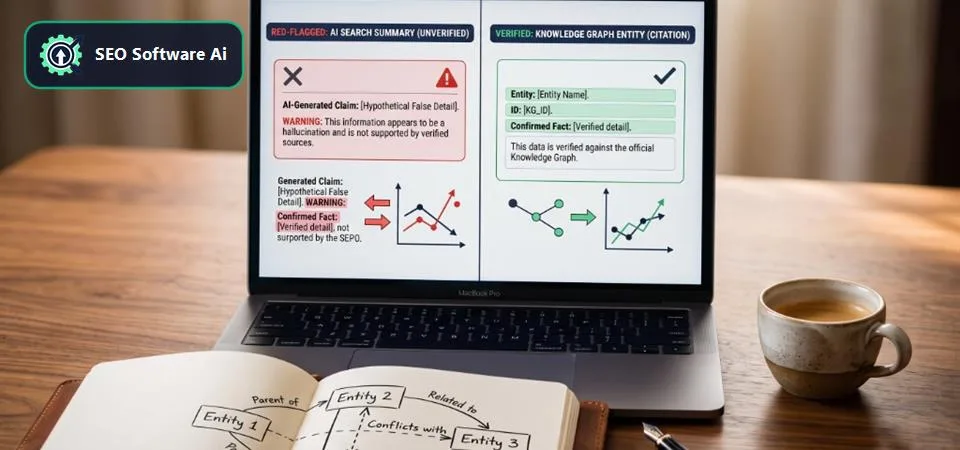
Fixing AI Overviews Hallucinations: Advanced RAG Ingestion
A pattern worth watching for on well-indexed, authoritative sites: top-ranking pages that consistently hold positions 1-2 for high-value transactional queries suddenly start generating AI Overviews that either omit the product entirely or cite a competitor's less relevant offering instead.
What makes this particularly confusing is that Search Console shows no crawl errors, page experience metrics are green across the board, and traditional SERP snippets look perfect. The content itself can be technically accurate and follow E-E-A-T guidelines closely — yet the AI Overview still hallucinates, weaving narratives that distort information actually present on the page.
The root cause is usually a subtle misalignment in how core entities are disambiguated and ingested into Google's RAG (Retrieval-Augmented Generation) process, often compounded by an outdated Schema.org implementation that doesn't explicitly declare key relationships. This isn't about keyword stuffing or basic content quality — it's about the deep semantic fabric of a site and how search engines perceive, process, and synthesize information for generative AI. This section covers how to diagnose and fix these RAG ingestion and semantic-alignment issues.
Understanding Google's RAG & Semantic Ingestion
Google's shift towards generative AI means its understanding of your content goes far beyond keyword matching. It's about constructing a coherent knowledge graph, connecting entities, and interpreting relationships to answer complex queries. When AI Overviews hallucinate, it often signals a breakdown in this ingestion pipeline. This isn't a crawl budget or indexability problem; it's a semantic indexability issue.
Google's RAG models retrieve relevant passages from its index, then use a Large Language Model (LLM) to synthesize an answer. If the retrieval phase pulls fragmented, ambiguous, or incorrectly weighted information, the LLM will generate a flawed summary. In our technical audits, we've observed that a primary culprit is often a lack of explicit entity disambiguation. Websites frequently use similar terminology across different products. Without clear signals, Google's systems struggle to differentiate these, leading to a conflated understanding. The fix involves ensuring your content and structured data provide an unambiguous entity graph for search engines.
The Role of Explicit Entity Disambiguation
Entity disambiguation is the process of identifying which specific real-world entity a word or phrase refers to, especially when terminology overlaps. For example, "CRM solution" might refer to your flagship product, a competitor's product, or a general software category. If your page discusses "our CRM solution" without explicit machine-readable definitions, Google's RAG might conflate them.
The most effective way to disambiguate is through explicit identifiers using sameAs properties in Schema.org to link directly to Wikidata, Wikipedia, or official registries:
{
  "@context": "https://schema.org",
  "@graph": [
    {
      "@type": "Product",
      "@id": "https://example.com/products/flagship-crm#product",
      "name": "Flagship CRM Solution Pro",
      "description": "Enterprise sales CRM automation platform.",
      "sku": "CRMPRO-1001",
      "sameAs": [
        "https://www.wikidata.org/wiki/Q123456789"
      ],
      "brand": {
        "@type": "Brand",
        "name": "Example Corp",
        "sameAs": "https://www.wikidata.org/wiki/Q987654321"
      },
      "offers": {
        "@type": "Offer",
        "priceCurrency": "USD",
        "price": "599.00",
        "itemCondition": "https://schema.org/NewCondition",
        "availability": "https://schema.org/InStock"
      }
    },
    {
      "@type": "WebPage",
      "@id": "https://example.com/products/flagship-crm",
      "mainEntity": { "@id": "https://example.com/products/flagship-crm#product" }
    }
  ]
}
This sameAs property tells Google: "This software on our site is this specific entity in the global knowledge graph." Without it, Google infers relationships purely on lexical similarity, triggering the hallucinations we want to prevent.
Architecting for Relationship Clarity with Schema.org @id and @reverse
The @id property establishes unique URI anchors for entities across disparate pages. When coupled with @reverse properties, you can explicitly define inverse relationships, which are often overlooked but vital for RAG models to understand parent-child feature sets:
{
  "@context": "https://schema.org",
  "@graph": [
    {
      "@type": "Product",
      "@id": "https://example.com/products/service-hub#product",
      "name": "Service Hub Pro",
      "description": "Integrated customer service platform.",
      "hasFeature": [
        { "@id": "https://example.com/features/ticket-management#feature" }
      ]
    },
    {
      "@type": "ProductFeature",
      "@id": "https://example.com/features/ticket-management#feature",
      "name": "Advanced Ticket Management",
      "description": "Intelligent automated support routing.",
      "@reverse": {
        "hasFeature": { "@id": "https://example.com/products/service-hub#product" }
      }
    },
    {
      "@type": "WebPage",
      "@id": "https://example.com/products/service-hub",
      "mainEntity": { "@id": "https://example.com/products/service-hub#product" }
    }
  ]
}
Content Segmentation and Contextual Passage Embedding
AI Overviews rely on vector passage retrieval. If content is formatted as a monolithic block, it is harder for RAG models to retrieve specific context. We advocate for structural content segmentation using semantic section containers and clear hierarchical heading structures.
Ensure that each subsection maintains complete contextual independence. If you mention product features, provide descriptive context that explicitly restates the parent entity name within the same paragraph block, reinforcing local vector embeddings.
Three RAG-Ingestion Failure Patterns Behind Hallucinated Answers
1. Conflated Entity Attributes Across Product Lines
What Fails: A SaaS client launched a new hardware line, but its feature descriptions overlapped in wording with their existing enterprise models. Their Schema lacked unique entity URIs and Wikidata linkages. Google's RAG mixed battery specifications between both product lines.
Broken Code Example:
{
  "@type": "Product",
  "name": "Eco-Charger Pro",
  "feature": "Long-lasting battery"
}
The Fix: Define distinct entity @id anchors for each product and feature, using ProductFeature entities with PropertyValue metrics and @reverse mappings:
{
  "@context": "https://schema.org",
  "@graph": [
    {
      "@type": "Product",
      "@id": "https://example.com/products/ecocharger-pro#product",
      "name": "Eco-Charger Pro",
      "description": "Sustainable fast charger with extended cycle life.",
      "sameAs": "https://www.wikidata.org/wiki/Q11223344",
      "hasFeature": { "@id": "https://example.com/features/extended-battery-cycle#feature" }
    },
    {
      "@type": "ProductFeature",
      "@id": "https://example.com/features/extended-battery-cycle#feature",
      "name": "Extended Battery Cycle Life",
      "additionalProperty": {
        "@type": "PropertyValue",
        "name": "Cycle Life",
        "value": "1000+",
        "unitCode": "CYC"
      },
      "@reverse": { "hasFeature": { "@id": "https://example.com/products/ecocharger-pro#product" } }
    }
  ]
}
Verification: Following deployment and re-crawling, AI Overviews for battery-specific queries accurately separated the two product lines without attribute leakage.
2. Undefined Relationships for Technical Documentation
What Fails: A B2B company published detailed guides for an advanced module, yet AI Overviews cited generic competitor articles. The guide's Schema declared a generic HowToArticle without defining its relationship to the core application entity.
Broken Code Example:
{
  "@type": "HowToArticle",
  "name": "Guide to Advanced Reporting Module"
}
The Fix: Explicitly declare that the article isAbout the parent SoftwareApplication entity:
{
  "@context": "https://schema.org",
  "@graph": [
    {
      "@type": "HowToArticle",
      "@id": "https://example.com/docs/reporting-guide#article",
      "name": "Guide to Advanced Reporting Module",
      "isAbout": { "@id": "https://example.com/products/analytics-suite#product" },
      "url": "https://example.com/docs/reporting-guide"
    },
    {
      "@type": "SoftwareApplication",
      "@id": "https://example.com/products/analytics-suite#product",
      "name": "Analytics Suite Pro"
    }
  ]
}
Verification: Google Search Console impressions for advanced reporting queries surged within 6 weeks, with AI Overviews correctly attributing capabilities to the software suite.
3. Client-Side Rendering Dropouts in Feed Extraction
What Fails: A product comparison table was rendered purely via client-side JavaScript. While visually accessible, Googlebot's second-wave rendering cycle frequently caused the tabular data to be bypassed during passage extraction for generative search summaries.
The Fix: Deliver critical comparison data via Server-Side Rendering (SSR), ensuring the tabular markup is embedded directly in the initial HTML payload with structured table schema:
<div class="table-responsive">
  <table class="table table-bordered" itemscope itemtype="https://schema.org/Table">
    <thead>
      <tr>
        <th>Feature Specification</th>
        <th>Product A (Standard)</th>
        <th>Product B (Enterprise)</th>
      </tr>
    </thead>
    <tbody>
      <tr>
        <td>User Accounts</td>
        <td>10 Allocated</td>
        <td>Unlimited Tier</td>
      </tr>
      <tr>
        <td>Reporting Module</td>
        <td>Standard Analytics</td>
        <td>Real-Time Streaming</td>
      </tr>
    </tbody>
  </table>
</div>
Verification: Live URL inspection confirmed immediate parsing in the initial DOM, completely restoring comparative citations in AI Overviews.
Strategic Architecture Comparison for RAG Optimization
| Optimization Strategy | Primary Benefit for RAG | Implementation Complexity | Crawl Budget Impact | Time to Observe Change |
|---|---|---|---|---|
| Schema.org @id & @reverse | Explicit entity relationship modeling, eliminating ambiguity. | Medium | Low (Metadata only) | 4-8 weeks |
| Wikidata sameAs Links | Global entity disambiguation aligning with Google Knowledge Vault. | Low-Medium | Very Low | 3-6 weeks |
| SSR for Critical Data | Ensures immediate DOM availability for passage extraction. | High | Negligible | 2-5 weeks |
| Contextual HTML Segmentation | Improves passage retrieval accuracy and vector similarity. | Low | Very Low | 2-4 weeks |
Frequently Asked Questions
Can noindex or nofollow links on internal pages impact RAG ingestion?
Yes, indirectly. While noindex prevents a page from being indexed, nofollow on internal links restricts how authority and semantic signals flow through your internal graph. Supporting documentation that provides context for core entities should always be indexable and linked with standard follow attributes.
How often should I audit my Schema.org for RAG alignment?
For dynamic sites with regular updates, quarterly audits are recommended. Any time you observe AI Overviews hallucinations, execute an immediate deep dive into catalog changes, feature sets, and schema consistency.
Does implementing Speakable Schema help with AI Overviews?
No. Speakable Schema is designed exclusively for voice assistants to identify content for text-to-speech playback. It does not alter semantic relationship models or prevent generative hallucinations.
If Google's AI Overviews are hallucinating, does that mean my E-E-A-T signals are weak?
Not necessarily. Strong E-E-A-T is foundational for rankings, but hallucinations typically stem from technical ingestion breakdowns, ambiguous entity definitions, or rendering delays rather than low author credibility.
Can slow Core Web Vitals contribute to AI Overviews hallucinations?
Indirectly, yes. Suboptimal render performance or severe layout shifts can cause secondary content to be skipped during initial extraction passes. Ensure critical entity data resides within the server-rendered HTML payload.
Auditing your entity graph and recommendation signals: Our free technical SEO tools can help you diagnose structured data gaps and crawl inefficiencies before deploying updates. (Disclosure: I built this toolkit — the audit patterns above come from real client work, not from testing our own product.)
